CUI Data Flow Diagram for CMMC: What to Include, How to Build It, and How to Check Your Scope
If a prime, a consultant, or a C3PAO just asked you for a CUI data flow diagram for CMMC, here’s the short version before you open Visio. The diagram has to show where Controlled Unclassified Information (CUI) — sensitive-but-unclassified government information you’re contractually required to safeguard — enters your environment, where it’s created, stored, processed, and transmitted, who touches it, where it’s backed up, and where it finally leaves or is destroyed.
Get it right and you can defend the smallest accuratescope — sometimes shrinking it, sometimes surfacing systems you have to fix before assessment. Get it wrong, and the culprit is almost always a system nobody thought handled CUI: email, a backup, a help-desk ticket, a synced folder on a laptop. Then you either over-build controls you didn’t need, or you walk into an assessment with a hole in your boundary.
Who this is for:contractors who already handle CUI, or are scoping for a CMMC Level 2 self-assessment or third-party (C3PAO) assessment. Who it’s not for:if you only handle Federal Contract Information (FCI) as a Level 1 contractor, you don’t need a CUI data flow diagram — though you still have to specify your Level 1 scope and self-assess the systems that handle FCI.
The fast answer
| Your question | The direct answer |
|---|---|
| Do I need a CUI data flow diagram for CMMC? | Not as a single named control — but yes, in practice. The rule requires you to define your assessment scope, keep an asset inventory, and have an SSP and network diagram. The data flow diagram is the artifact that makes all of those agree. |
| Is it the same as a network diagram? | No. A network diagram shows your infrastructure (devices, segments, connections). A CUI data flow diagram shows information movement — where CUI comes from, where it goes, who moves it, and what controls it. You need both, and they have to match. |
| Which CMMC level is this for? | Level 2, which protects CUI and maps to NIST SP 800-171 Revision 2 (110 requirements across 14 families). |
| What control connects most directly? | AC.L2-3.1.3 — “Control the flow of CUI in accordance with approved authorizations.” |
| What should I do first? | Build a flow table before you draw anything: each CUI source, system, user role, destination, external party, control method, and the evidence that proves it. |
The honest part most vendors won’t lead with
There is no single official, CMMC-blessed template that makes a data flow diagram “pass.” You can’t buy the right answer. A gorgeous diagram won’t save a sloppy scope, and a plain one drawn in PowerPoint that matches your SSP, your inventory, and what your people actually do will beat it every time.
That’s good news. It means the work is knowable, you can do it in-house, and the rest of this page is the checklist to do exactly that. The only place outside help reliably earns its fee is when the diagram is complete but the scoping decisions behind it are wrong — and we’ll show you how to tell the difference.
What we verified for this guide
What is a CUI data flow diagram for CMMC?
A CUI data flow diagram for CMMC is a map of how Controlled Unclassified Information moves through your organization — from where it enters, through the people, systems, and facilities that touch it, to where it leaves or is destroyed. It’s not a network drawing. It connects CUI sources, systems, users, storage, transfer paths, external parties, and control points so your CMMC scope can be explained and defended in an assessment.
Think of it as the answer to one question an assessor will keep asking in different ways: “Show me everywhere this data goes.” Here’s how the rule’s concerns map onto the diagram itself:
| What the rule cares about | Where it shows up on your diagram |
|---|---|
| CUI definition and category | The source label and CUI-type tag on each entry point |
| Process, store, or transmit | The nodes and the arrows between them |
| Approved authorization (AC.L2-3.1.3) | The control/enforcement note on each arrow |
| The system boundary (CA.L2-3.12.4) | The assessment-boundary line and the SSP cross-reference |
CUI, defined — because the diagram starts here
CUI is information the government creates or possesses (or that’s created or possessed for the government) that a law, regulation, or government-wide policy requires you to safeguard or restrict from broad dissemination. It is not classified information. In the defense world it most often shows up as Controlled Technical Information— drawings, specs, source code, test data — or as Export Control or Procurement and Acquisition CUI when your contract and markings point there. The authoritative source is the NARA CUI Registry.
That matters because the most common scoping mistake isn’t drawing the diagram wrong — it’s misjudging what’s actually CUI in the first place, which then mislabels every box downstream. See our FCI vs. CUI guide for the full breakdown.
Why this matters specifically for CMMC Level 2
CMMC has three levels. Level 1 protects FCI. Level 2 protects CUI and maps to NIST SP 800-171 Revision 2 — 110 security requirements organized into 14 control families. Level 3 adds 24 selected requirements from NIST SP 800-172 on top of the 110, requires a prerequisite Final Level 2 (C3PAO) status, and is assessed by the government’s DIBCAC. Because Level 2 is the level the largest number of contractors face — and the first level with a C3PAO path — a well-built CUI data flow diagram is where most programs succeed or fail.
Is a CUI data flow diagram required for CMMC?
There is no rule that names “the CUI data flow diagram” as a standalone, mandatory deliverable with a fixed format. But for most Level 2 scoping and assessment-prep work it is effectively necessary, because it explains the CUI movement behind the documents the rule does require — your scope, SSP, asset inventory, and network diagram. A weak diagram is usually the first sign of a weak scope.
- Required by name? No. No single visual template is anointed as “compliant.”
- Required by evidence? In practice, yes. You still have to show where CUI is processed, stored, transmitted, protected, and separated — and reconcile that across your documents.
| What the rule states | Where the data flow diagram fits |
|---|---|
| The assessment scope must be specified before assessment (§ 170.19) | You can’t specify scope you can’t see; the diagram is how you see it |
| CUI Assets, Security Protection Assets, CRMAs, and Specialized Assets must be documented in the asset inventory, SSP, and network diagram (§ 170.19) | The diagram is what makes those documents consistent with one another |
| An up-to-date SSP must be in place at assessment, or the assessment can’t be completed (32 CFR Part 170) | The diagram is the boundary picture the SSP describes |
| “Control the flow of CUI in accordance with approved authorizations” (AC.L2-3.1.3) | The diagram is the evidence that you know — and control — those flows |
The line in the rule worth memorizing
This is the part competitors gloss over, so read it slowly. Under 32 CFR Part 170, you must have a System Security Plan (CMMC requirement CA.L2-3.12.4) in place at the time of assessment to describe each information system within your scope. The rule then states plainly that the absence of an up-to-date SSP “would result in a finding that an assessment could not be completed due to incomplete information and noncompliance with 48 CFR 252.204-7012.”
Translation: show up without an up-to-date SSP that describes the information systems in scope, and the assessment doesn’t just go poorly — it can’t be completed. The CUI data flow diagram is how you make that boundary legible before the SSP, inventory, and network diagram get compared.
Where the diagram plugs into scoping and into AC.L2-3.1.3
Two anchors, both primary-source. Scoping (§ 170.19): after you categorize your assets, you specify your assessment scope and hand the assessor documentation that defines it. The diagram is how you decide which assets are even in play. The control (AC.L2-3.1.3):“Control the flow of CUI in accordance with approved authorizations.” You can’t credibly claim to control flows you haven’t mapped. NIST SP 800-171A breaks that requirement into assessment objectives, and your diagram is the evidence that ties them together. Our full CMMC scoping guide covers the five asset categories and the step-by-step scoping process.
The 15 places CUI hides before your assessment
The system where your team intentionally stores CUI is rarely the whole story. CUI also lives — and creates copies — in systems that cache, sync, log, back up, protect, support, transmit, or troubleshoot it, even when nobody thinks of those as “CUI systems.” This is the table we wish every contractor had before their first scoping call. For each flow point, it shows why it matters, the asset or scoping treatment it usually falls into, the evidence to attach, and the mistake that kills scopes.
| CUI flow point | Why it matters for CMMC | Likely asset / scoping treatment | Evidence to attach | Common miss |
|---|---|---|---|---|
| 1. Government/prime intake portal | Where CUI first enters | CUI Asset (the receiving system) | Contract/flow-down, portal access, download logs, marking instructions | Treating portal downloads as “not our system” once files land locally |
| 2. Email (inbound & outbound) | Email transmits CUI and spawns copies | CUI Asset / transmission path | Mail-flow rules, encryption method, DLP, access groups, logs | A “no CUI in email” policy contradicted by what’s actually attached |
| 3. Controlled repository | Primary CUI storage | CUI Asset | Access groups, config, audit logs, backup location, SSP reference | Desktop sync silently creating unmanaged copies |
| 4. CAD / CATIA / PLM / PDM | Engineering tools process controlled technical data | CUI Asset | Project access, export controls, file paths, workflow | Diagramming only the file share, not the engineering system |
| 5. ERP / MRP / quality system | May hold drawings, inspection records, derivative CUI | CUI Asset or CRMA | Role permissions, exports, reports, integrations | Assuming “business systems” can’t contain CUI |
| 6. Endpoints / laptops | Local processing and storage expand scope | CUI Asset (or out-of-scope only under strict VDI) | Device policy, encryption, EDR, download controls, logs | Users download CUI locally; the diagram ignores it |
| 7. VDI / remote access | Can reduce endpoint scope — but only narrowly | Out-of-scope endpoint only if KVM-only (see below) | VDI config, clipboard/download restrictions, KVM rationale | Calling laptops out-of-scope while still allowing file transfer |
| 8. Identity / MFA / admin systems | They protect CUI assets | Security Protection Asset (SPA) | IdP config, MFA policy, privileged-access list | Leaving identity off the diagram “because it doesn’t store CUI” |
| 9. SIEM / EDR / logs | Protect CUI assets and can contain CUI fragments | SPA, or CUI / Security Protection Data path | Log sources, retention, access, sanitization rules | Filenames, paths, or screenshots exposing CUI inside logs/tickets |
| 10. Ticketing / help desk | Tickets collect screenshots, filenames, incident detail | SPA, CUI Asset, or ESP path | Ticket-handling policy, access list, redaction rules | An MSP or help desk outside the boundary receiving CUI by accident |
| 11. Backups / archives | A copy of CUI is still CUI | CUI Asset, CSP, or ESP path | Backup location, encryption, restore tests, admin access | Cloud backup quietly widening the boundary |
| 12. Printers / scanners / removable media | Physical output and portable media are alternate flows | CUI Asset or process node | Media policy, printer authorization, destruction records | Printed CUI never represented on the diagram |
| 13. Subcontractor / supplier transfer | CUI leaves you and triggers flow-down | Outbound CUI flow | Subcontract clause, transfer method, recipient authorization | Sending a sub more CUI than the job actually needs |
| 14. MSP / MSSP / external provider | External providers can pull CUI/SPD into scope | ESP or CSP treatment | Service description, CRM, support access, whether service handles CUI/SPD, any claimed CMMC/Cyber AB status | Treating “outsourced” as “out of scope” |
| 15. AI / search / OCR / indexing | These tools copy, index, summarize, or retain CUI | CUI Asset, CRMA, or prohibited workflow | Approval record, retention terms, index boundary, access controls | CUI ending up in embeddings, search indexes, or AI prompts |
A few of these deserve emphasis because they’re where assessments actually go sideways: email, backups, ticketing, local sync, and MSP access. If your diagram says “CUI stays in the enclave” but any of those five quietly carry it elsewhere, your scope is wrong and the rest of your program is built on a bad map.
► Found two or three of these in your own environment? Good — that’s the point.
Map each one before you redraw anything. Our free CUI Flow Worksheet turns this list into a working flow table — source, destination, system, owner, asset category, control, and evidence — so nothing slips through. Use placeholders, not real data: never put CUI, drawings, contract numbers, or customer names in the worksheet.
↓ Download the free CUI Flow Worksheet (CSV)What should a CMMC CUI data flow diagram include?
A useful CMMC CUI data flow diagram includes every place CUI is received, created, stored, processed, transmitted, protected, backed up, shared, and disposed of — with each node and arrow tied to an owner, an asset category, an authorization, a control method, and a piece of evidence. The bar isn’t “pretty.” The bar is “accurate, complete, and reconcilable with your SSP and inventory.”
At minimum, show:
- CUI source — government, prime, portal, email, SFTP, API, physical media, customer system.
- CUI category — Controlled Technical Information, Export Control, Procurement and Acquisition, or another applicable CUI Registry category.
- Entry point — how CUI first arrives.
- Users and roles — engineering, contracts, quality, production, IT, shipping, suppliers.
- Systems — email, repository, CAD/PLM, ERP, ticketing, SIEM, backups, endpoints, printers.
- Storage locations — file shares, cloud storage, databases, local sync folders, backups.
- Processing points — anything that opens, modifies, converts, indexes, inspects, manufactures, or reports on CUI.
- Transmission paths — email, SFTP, portal upload, API, VPN, Teams, secure transfer.
- External parties — primes, subs, suppliers, MSPs, MSSPs, cloud providers, consultants.
- Protection systems — identity, MFA, EDR, SIEM, DLP, encryption, firewall, proxy, VDI controls.
- Disposal / return — deletion, destruction, retention schedule, contract closeout, return-to-government.
- Evidence references — the SSP section, inventory row, policy, config, log, or ticket that proves each claim.
What to leave off
Don’t drown the diagram in routing detail that belongs on the network diagram, and don’t represent systems you’ve genuinely separated as if they’re in play. And never put actual CUI— real drawings, contract numbers, export-controlled specifics, customer names, credentials, internal IPs — into a public example or a web form. Use placeholders.
CUI data flow diagram vs. network diagram vs. asset inventory vs. SSP
These four artifacts answer different questions, and CMMC scope gets risky the moment they disagree. A network diagram shows what’s connected; a data flow diagram shows where CUI goes; an asset inventory classifies each system; the SSP explains how each control is implemented. Assessors compare them against one another, and inconsistencies are a classic failure point.
| Artifact | The question it answers | What it should prove | Primary-source anchor | Common mistake |
|---|---|---|---|---|
| CUI data flow diagram | Where does CUI go? | CUI enters, moves, copies, leaves, and is controlled through approved paths | AC.L2-3.1.3; § 170.19 scoping | Drawing only the “happy path” |
| Network diagram | What is connected to what? | Boundaries, segments, connections, remote access, external links | § 170.19 | Showing the network but not CUI movement |
| Asset inventory | What assets exist, and how are they categorized? | CUI Asset, SPA, CRMA, Specialized, Out-of-Scope treatment | § 170.19 | Leaving out ticketing, backups, logs, or admin systems |
| SSP | How are the controls implemented? | Scope, control implementation, responsible roles, evidence references | CA.L2-3.12.4 (NIST SP 800-171 Rev. 2) | The SSP says one thing while the diagrams show another |
| POA&M | What gaps remain, and how are they fixed? | Remediation owner, dates, and what is (and isn’t) eligible for a plan | 32 CFR Part 170 | Trying to defer requirements that can’t be deferred |
The practical rule: if a system appears on your data flow diagram but is missing from your SSP or inventory, that’s a scoping problem. If your network diagram shows a connection your flow diagram ignores, that’s a question you’ll be answering on assessment day.
How to build a CUI data flow diagram for CMMC, step by step
Build the table before the drawing. Start with contracts and CUI categories, interview the people who actually touch the data, map every movement and copy, classify each asset under the scoping rules, then reconcile the diagram against your SSP, inventory, and network diagram. The diagram is the output; the table is where the real work happens.
Step 1 — Confirm whether you receive, create, or transmit CUI. Start with contract documents, flow-down clauses, markings, and handling instructions. Use the NARA CUI Registry to avoid guessing.
Step 2 — Map the business process, not the software. Proposal intake, engineering, manufacturing, quality, supplier collaboration, support, shipping, closeout. CUI follows the work.
Step 3 — Interview the people who touch CUI. Contracts, engineering, program management, quality, production, IT, security, shipping, supplier management. Diagrams fail when IT draws the intended architecture and misses what users actually do.
Step 4 — Build the flow table. One row per flow. These are the columns:
| Flow ID | CUI source | CUI category | Entry method | System/node | User role | Destination | External party | Asset category | Control / enforcement | Evidence | SSP reference |
|---|---|---|---|---|---|---|---|---|---|---|---|
| F-001 | (placeholder) | (placeholder) | (placeholder) | (placeholder) | (placeholder) | (placeholder) | (placeholder) | (placeholder) | (placeholder) | (placeholder) | (placeholder) |
Step 5 — Draw entry, internal movement, outbound sharing, and disposal. Entry → creation → storage → processing → access → system-to-system movement → external sharing → backup → retention/disposal → return.
Step 6 — Force the uncomfortable questions. Can users download CUI locally? Email it? Print it? Paste it into a ticket? Does it land in logs? Get indexed by search or fed to an AI tool? Can the MSP’s tools reach it? Can a backup restore it outside the boundary? Can a supplier receive it? Every “yes” is a flow that belongs on the diagram.
Step 7 — Classify internal nodes, then handle external services separately. Sort every internal node into the five Level 2 asset categories (next section). Then handle external services: decide whether the provider is a Cloud Service Provider or a non-CSP External Service Provider, whether it processes, stores, or transmits CUI or Security Protection Data, and how the relationship is documented in your SSP, service description, and customer responsibility matrix (CRM). The rule’s trigger: a provider falls into the CMMC ESP analysis when CUI or Security Protection Data is processed, stored, or transmitted on the provider’s assets.
Step 8 — Tie every arrow to authorization and enforcement. For each flow: who’s allowed to send it, who’s allowed to receive it, what system enforces that, what policy authorizes it, what evidence proves it, and what happens if someone tries an unapproved route.
Step 9 — Reconcile. Cross-check the diagram against the SSP, asset inventory, and network diagram. Fix every disagreement.
Step 10 — Version-control it. Owner, version number, last-reviewed date, change trigger, and links to the related SSP section, network diagram version, and inventory export. A “draft” diagram is fine for readiness; assessment evidence should be final and approved.
How a CUI data flow diagram affects your CMMC Level 2 scope
Your diagram doesn’t set scope by itself — it exposes the facts that set scope. Under § 170.19, every internal asset is treated differently depending on whether it handles CUI, protects CUI assets, could handle CUI but is managed not to, is specialized, or is genuinely separated. The category a system lands in decides whether it faces all 110 requirements, just gets documented, or sits outside the assessment entirely. That’s the single biggest driver of your cost and timeline.
| If the diagram shows… | Category to evaluate | Why it matters |
|---|---|---|
| A system that processes, stores, or transmits CUI | CUI Asset | Assessed against all relevant Level 2 requirements |
| A system that provides security functions for CUI assets | Security Protection Asset (SPA) | Protects the scope (SIEM, MFA, firewall, MSP tooling); assessed against the requirements relevant to what it does — even if it never touches CUI |
| A system that could handle CUI but is managed not to | Contractor Risk Managed Asset (CRMA) | Documented and risk-managed in the SSP with written rationale; not assessed against the full control set |
| Hard-to-secure gear that touches CUI (CNC, OT/IoT, test equipment, GFE) | Specialized Asset | Documented and risk-managed in the SSP; limited assessment at Level 2 |
| A system that can’t reach CUI and is separated | Out-of-Scope Asset | Excluded — but you must be able to prove the separation |
External providers (MSP, MSSP, backup, cloud) aren’t a sixth category — they get the separate ESP/CSP treatment in Step 7, documented with a CRM. And the rule’s definition of an Out-of-Scope Asset is strict: assets that “cannot process, store, or transmit CUI because they are physically or logically separated” from CUI systems — exceptanything that provides security protection for a CUI asset. In plain terms: if it protects CUI, it’s not out of scope, even if it never stores CUI.
The VDI nuance — real, but narrow
There’s one genuine shortcut in the rule, and it’s worth getting exactly right because it’s widely overstated. A virtual desktop endpoint can be out-of-scopeif it’s configured so that nothing — no processing, storage, or transmission of CUI — passes “beyond the Keyboard/Video/Mouse sent to the VDI client.” At Levels 2 and 3, you must be prepared to justifywhy that endpoint can’t process, store, or transmit CUI. So “we use VDI” doesn’t make laptops out-of-scope. “We use a KVM-only virtual desktop that blocks downloads, clipboard, and local storage, and here’s the configuration evidence” might. Don’t generalize the carve-out beyond what it says. See our CMMC secure enclave guide for the full architecture pattern.
Shrinking scope without breaking it
A clean diagram is what lets you argue for a smaller enclave honestly. The worst version of scope reduction is drawing a tight boundary your users bypass every day — that’s not a smaller scope, it’s an undocumented one. If your map just revealed CUI spread across far more systems than you expected, that’s not a failure. It’s the most valuable thing this exercise produces, and it’s the moment to decide whether you fix the architecture before you spend a dollar on assessment. See CMMC enclave vs. enterprise compliance for an honest comparison of both approaches.
► If your diagram just expanded your scope, don’t rush to a C3PAO
Realizing CUI touches your ERP, your backups, and your MSP’s tools changes the order of operations. Spending on a certification assessment before your boundary is right is how contractors waste the most money. Compare your options — readiness/managed compliance, a CUI enclave, GRC evidence tooling, or assessment — so you spend in the right sequence.
Compare CMMC provider categories →What “control the flow of CUI” actually means (AC.L2-3.1.3)
“Control the flow of CUI” means more than knowing where it goes — it means defining and enforcing the rules for its movement. The control, AC.L2-3.1.3 in CMMC notation, reads: “Control the flow of CUI in accordance with approved authorizations.” NIST SP 800-171A breaks that into assessment objectives an assessor will work through, and your diagram is the evidence that ties them together.
The objectives, in plain English, ask whether you’ve defined: information flow control policies; the methods and enforcement mechanisms for controlling CUI flow; the designated sources and destinations for CUI within and between systems; the authorizations for those flows; and whether the approved authorizations are actually enforced.
So for every flow on your diagram, you should be able to answer: What CUI moves? Who can move it? From where, to where? What technical or procedural method controls it? What evidence proves the method exists? And what happens when someone tries an unapproved route?
The dangerous middle ground is policy-only enforcement. Training and a handbook matter — but if your diagram shows CUI downloading to laptops, leaving by personal email, or flowing into an unapproved tool, and your only control is “we told people not to,” that’s a hard evidence problem. “Trust” is not an enforcement mechanism. The CMMC Level 2 checklist covers the full control-by-control evidence expectations.
What a C3PAO or assessor looks for in your CUI flow
An assessor isn’t grading your artwork. They’re checking that your scope is coherent, that the diagram matches your SSP and inventory, and that your evidence supports the assessment objectives — especially AC.L2-3.1.3. Mismatches between what the diagram claims and what your inventory and configs show are among the fastest ways to draw a finding. A C3PAO is a CMMC Third-Party Assessment Organization — an outfit authorized to conduct the formal Level 2 certification assessment. For a guide to finding and vetting one, see the best C3PAO for CMMC Level 2 and our CMMC certification process overview.
| What the assessor asks | What the diagram has to show |
|---|---|
| What CUI is allowed to move? | The CUI category and the labeled flow |
| Where can it move from? | The approved source node |
| Where can it move to? | The approved destination node |
| Who can move it? | The role or user group |
| What enforces the flow? | DLP, access group, firewall, VDI restriction, encryption, workflow rule |
| What proves it works? | Config, logs, access review, audit record, test evidence |
| Where is it described? | The SSP section, policy, network diagram, and inventory row |
Two things worth internalizing. First, evidence should be final, not draft.A working diagram is great for readiness, but it shouldn’t be treated as assessment-ready until it’s approved, reconciled, and version-controlled. Second, independence is real. Under the Cyber AB’s Code of Professional Conduct and the CMMC Assessment Process, a C3PAO can’t assess work that it — or an affiliated company — provided as consulting, implementation, or product services. That’s why “find a C3PAO” is usually the last step, not the first.
Example: a CUI data flow diagram for a small aerospace manufacturer
A small aerospace shop’s CUI flow is almost never just a file share. It usually includes a prime’s portal, email, ERP/MRP, a CAD tool like CATIA, a PLM/PDM system, a quality system, a supplier interface, shop-floor equipment, backups, tickets, and outbound transfers to subcontractors. Here’s a worked, fictional example to show how the map should force scope questions before assessment.
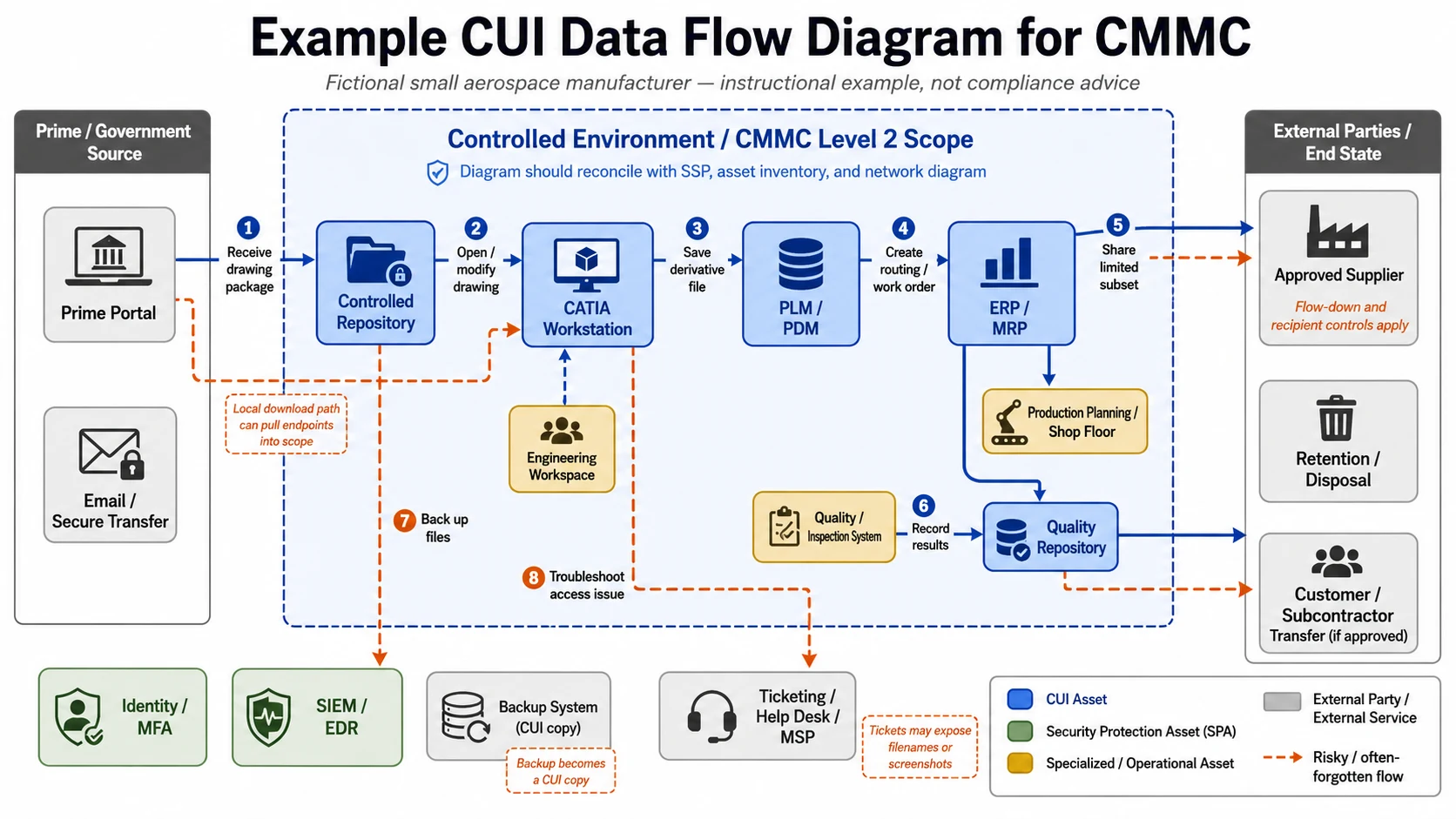
| Flow | From | System | Action | To | Scope concern |
|---|---|---|---|---|---|
| 1 | Prime portal | Browser / download folder | Receive drawing package | Controlled repository | The local download path must be controlled — or that laptop is in scope |
| 2 | Repository | CATIA workstation | Open and modify drawing | Engineering workspace | The endpoint is likely a CUI Asset |
| 3 | CATIA | PLM/PDM | Save derivative file | Controlled project folder | Contractor-generated CUI is still CUI |
| 4 | PLM/PDM | ERP/MRP | Create routing / work order | Production planning | The ERP may now be in scope |
| 5 | Engineering | Supplier portal | Share a limited subset | Approved supplier | Flow-down and recipient controls apply |
| 6 | Quality | Inspection system | Record results | Quality repository | Quality records can inherit CUI |
| 7 | Repository | Backup system | Back up files | Cloud or on-prem backup | The backup is now a CUI copy |
| 8 | User / IT | Ticketing system | Troubleshoot an access issue | Help desk / MSP | Tickets can expose CUI filenames and screenshots |
Diagram build notes:lay it out left-to-right — government/prime source on the left, the controlled environment or enclave in the center, support systems (identity, SIEM, backup, ticketing) along the bottom, and suppliers/customers/disposal on the right. Color-code each node by asset category, tag major arrows with the enforcing control, and use a distinct line style (dashed) for the risky, easy-to-forget flows — local downloads, backups, tickets, supplier transfers.
The mistakes that make a CUI data flow diagram fail
Most bad CUI data flow diagrams fail for one reason: they show the intended architecture instead of the real workflow. The diagram has to reveal where CUI actuallygoes — including the awkward copies, the support systems, the external parties, and the user workarounds.
- Treating the network diagram as enough. It shows routers and VLANs, not CUI sources, destinations, authorizations, or evidence.
- Ignoring local downloads. If users can pull CUI from a portal to a laptop, that endpoint is on the map — unless it meets the narrow KVM-only VDI exception above.
- Leaving out backups. Backups preserve CUI; if backup admins and restore paths aren’t shown, your scope is wrong.
- Forgetting ticketing and screenshots. If you ban CUI in tickets, the diagram and evidence have to show how that’s enforced or monitored.
- Mislabeling MSP/MSSP tools as out-of-scope. If a provider’s tools can access, administer, monitor, or protect CUI assets, that provider gets explicit ESP/CSP treatment — and a CRM.
- Assuming “cloud” equals “compliant.” Moving CUI into a cloud platform doesn’t erase the need to define scope, responsibilities, and evidence. Under DFARS 252.204-7012, cloud services that store, process, or transmit covered defense information must meet FedRAMP Moderate-equivalent security requirements — a SOC 2 report or ISO 27001 certificate, on its own, does not satisfy that.
- Omitting outbound CUI. Supplier, subcontractor, and government-return flows matter — and the DFARS rules make a subcontractor’s status a real pre-award issue when the flowed-down work requires it.
Where this shows up in your contracts
The data flow diagram is an internal artifact, but the obligations behind it arrive through specific DFARS clauses. Knowing which clause does what tells you why scope, your SPRS posting, and your subcontractors all suddenly matter at once. (DFARS = Defense Federal Acquisition Regulation Supplement; SPRS = the Supplier Performance Risk System, the DoD database where assessment scores and affirmations are posted.)
| Clause | Title | What it does |
|---|---|---|
| 252.204-7012 | Safeguarding Covered Defense Information and Cyber Incident Reporting | Requires NIST SP 800-171 protection for CUI, FedRAMP Moderate-equivalent security for cloud handling CUI, and 72-hour incident reporting |
| 252.204-7019 | Notice of NIST SP 800-171 DoD Assessment Requirements | A solicitation provision telling offerors they need a current (within three years) NIST SP 800-171 DoD Assessment on record to be considered for award |
| 252.204-7020 | NIST SP 800-171 DoD Assessment Requirements | Requires your assessment score in SPRS — and requires applicable subcontractors to have a current assessment posted before subcontract award |
| 252.204-7021 | Contractor Compliance With the CMMC Level Requirements | The CMMC clause: requires the contracted CMMC level and flows the requirement down to subcontractors that handle FCI or CUI |
| 252.204-7025 | Notice of CMMC Level Requirements | A solicitation provision (effective Nov 2025): the contracting officer states the required CMMC level, and you’re not eligible for award without a current CMMC status and affirmation in SPRS |
How to validate the diagram before you rely on it
Validate the diagram with a line-by-line evidence test: every node has an owner and a category, every arrow has an approved source and destination and a control method, and every claim reconciles with the SSP, inventory, network diagram, configs, and logs. If a single arrow fails the test, you’ve found a gap worth fixing before an assessor finds it for you.
For every arrow, run the check: Do we know the CUI category? The source owner? The destination owner? Is the flow approved? Is it enforced technically, procedurally, or both? Is there evidence? Does the SSP describe it consistently? Is each system on the inventory? Does the network diagram support the connection? Is an external party involved? Does the flow create backup, log, ticket, print, or local copies we haven’t drawn?
Then have it reviewed by the people who actually live in it — IT/security, engineering, contracts, program management, quality, the shop floor, supplier management, and an executive sponsor.
Re-open the diagram whenever a new contract or CUI category arrives, you adopt a new cloud system or MSP tool, a collaboration or download policy changes, your backup architecture shifts, your enclave boundary moves, or a pre-assessment turns up a missing flow.
When to get help — and which CMMC provider category fits
If you can’t explain where CUI moves, you’re usually not ready for a formal assessment yet. Most contractors in that spot need readiness, scoping, enclave, or evidence help beforea C3PAO — because assessment organizations have to preserve independence and can’t fix the same engagement they assess.
| Provider category | Use it when… | Probably not the fit when… | What to verify first |
|---|---|---|---|
| Readiness / RPO / CMMC-focused MSP/MSSP | You don’t know where CUI enters or leaves; your SSP, inventory, and diagrams disagree; you need scoping, an SSP/POA&M, or remediation | Your scope is already stable and evidence is approved | Their CMMC track record, references, and how they keep readiness separate from any assessment role |
| CUI enclave / GCC High / secure collaboration | CUI is spread across too many business systems and you want to isolate it; you need secure collaboration with primes and suppliers | You only need help organizing existing evidence | Whether the environment actually meets the cloud requirements for CUI, with documentation |
| GRC / evidence-management software | Scope is mostly known; evidence exists but is scattered; you need SSP/POA&M, control ownership, and workflow discipline | You expect software alone to make you compliant | That it’s a supporting layer, not a substitute for implemented controls |
| C3PAO / assessment | Scope is stable, the SSP is assessment-ready, evidence is approved, and readiness says you’re close | You still have material gaps or an unsettled boundary | Current Cyber AB Marketplace status, and that they weren’t your remediation provider |
► Not sure whether this is a scoping, enclave, software, or assessment problem?
Tell us your level, scope, and timeline — not your CUI— and we’ll help you compare source-checked CMMC provider options that fit the problem you actually have, without routing you to an assessment provider before you’re ready.
How we produced this guide
The value of this page isn’t that we invented a requirement — it’s that we assembled the primary sources, the scoping rules, the assessment objectives, the CUI definitions, and real practitioner friction into one workflow you can act on.
We read 32 CFR Part 170 and its scoping section § 170.19; the CMMC Level 2 Scoping Guide v2.13 and Assessment Guide – Level 2 (DoD CIO); NIST SP 800-171 Revision 2 (control 3.1.3 and CA.L2-3.12.4) and NIST SP 800-171A; the DFARS CMMC subpart (clauses effective ); and the NARA CUI Registry.
What this page does notdo: it doesn’t give legal advice, it doesn’t guarantee a certification outcome, it doesn’t create an official Cyber AB or DoD template, and it doesn’t replace a C3PAO assessment. We don’t call any provider endorsed, verified, or preferred by us, the Cyber AB, or DoD unless that’s separately documented and disclosed.
Frequently asked questions
Is a CUI data flow diagram formally required for CMMC Level 2?
No single official layout is mandated as “the” CUI data flow diagram. But Level 2 requires you to define your scope, keep an asset inventory, and have a System Security Plan and network diagram, and the data flow diagram is the most practical way to make those agree. In practice, you need one.
Can my network diagram double as my CUI data flow diagram?
Sometimes one visual can carry both, but they answer different questions. A network diagram shows infrastructure and connections; a CUI data flow diagram shows where CUI enters, moves, is controlled, and leaves. Assessors generally expect to see both, reconciled.
What should a CUI data flow diagram include?
CUI sources and categories, entry points, systems, users, storage, processing points, transfer paths, external parties, backups, logs, support tools, disposal, asset categories, control methods, and evidence references.
Do backups count in a CUI data flow diagram?
Yes, if backups contain CUI. A backup is a copy of your data lifecycle, not an administrative afterthought, and it can quietly expand your boundary.
Do ticketing and help-desk systems count?
They can. If tickets include screenshots, filenames, incident detail, or support access into CUI systems, the ticketing workflow needs to be evaluated and shown.
Do email and Teams count?
They can. If CUI can be attached, previewed, synced, or transmitted in a way that exposes controlled content, those flows belong on the diagram.
Does moving to GCC High or SharePoint solve the diagram?
No. A secure platform can help, but the diagram still has to show users, flows, external parties, local sync, backups, permissions, and evidence.
Should subcontractors appear on the diagram?
Yes, if you share CUI with them or they support systems that touch CUI. The DFARS clauses also make a subcontractor’s CMMC status and assessment posting a real pre-award issue when the flowed-down work requires it.
Should AI tools or search indexes appear?
Yes, if they can ingest, index, summarize, store, or expose CUI. If they’re prohibited, show that policy and how it’s enforced.
Can a C3PAO help me fix my diagram?
Be careful here. Under the Cyber AB’s Code of Professional Conduct and the CMMC Assessment Process, an assessment organization can’t assess work it (or an affiliate) provided as consulting, implementation, or product services. If your diagram needs real fixing, use readiness help first and keep the assessment role separate.
Does CMMC Level 2 use NIST SP 800-171 Rev. 2 or Rev. 3?
Revision 2. NIST formally withdrew Revision 2 on and marks it as superseded by Revision 3 for NIST’s own purposes — but DoD’s CMMC rule still assesses Level 2 against Revision 2, and will until DoD incorporates Revision 3 through future rulemaking. So if a guide lists “800-171 r3” as the current CMMC requirement, treat it with caution.
Which CMMC control is most directly tied to the data flow diagram?
AC.L2-3.1.3: “Control the flow of CUI in accordance with approved authorizations.” The diagram is the primary evidence that you know where CUI moves and have defined and enforced the rules for its movement.
Keep going from here
- CMMC Level 2 Checklist — the full readiness picture this diagram feeds into
- CMMC Enclave vs. Enterprise Compliance — deciding how small your boundary can be
- CMMC Secure Enclave — VDI, GCC High, and secure collaboration design
- CMMC Certification Process — what a C3PAO assessment actually involves
- Best C3PAO for CMMC Level 2 — when you’re assessment-ready and choosing an assessor
- CMMC Scoping Guide — the 5 asset categories and step-by-step scoping process
- CMMC Scope Reduction — how to shrink your Level 2 boundary under 32 CFR 170.19
- FCI vs. CUI — what the difference means for your contract level
- CMMC Level 2 Requirements overview
- CMMC Readiness Checklist
► Need help deciding what type of CMMC provider you need?
Tell us your level, scope, and timeline, and we’ll match you with source-checked CMMC provider options.
Find My CMMC Path →