Box CMMC Compliance: Can You Use Box for FCI or CUI?
By The Defense Compliance Report Editorial Team — an independent trade publication on CMMC 2.0 and DIB compliance · Last verified September 2026
Box can be part of a CMMC-compliant setup, but Box alone doesn't make you compliant. If Box holds only Federal Contract Information (FCI), a company-managed plan can fit Level 1. For Controlled Unclassified Information (CUI), the exact Box product or service offering—not just the plan name—must meet the cloud rule, and Box must confirm your order, tenant, and features are inside that offering. You still own the setup.
Below you'll find three things. First, the Box CMMC compliance answer by plan and offering. Second, the one Box document most customers can't find. Third, a checklist to bring to your next Box renewal.
Two quick definitions. CMMC is the Cybersecurity Maturity Model Certification program run by the Defense Department. FedRAMP is the federal government's security program for cloud services.
Status, September 24, 2026: The Department of War (the Defense Department's newer official name) suspended CMMC Phase II on July 13, 2026.
Its CMMC page says all Phase I self-assessment requirements "remain firmly in place" and that implementation is paused in Phase 1. Its implementation memo says DFARS 252.204-7012 remains in effect. DFARS is the Defense Federal Acquisition Regulation Supplement, and 252.204-7012 is the contract clause behind the cloud rules on this page.
No replacement Phase II date or public Reform Task Force outcome appeared on the official CMMC pages checked September 24. What changed →
This page is for you if:
- you use Box, or are pricing it, for defense work;
- a prime contractor or assessor asked you to prove Box is acceptable; or
- files marked CUI are already landing in your Box.
It's not for you if:
- you searched for a product sold as "CMMC in a box." See CMMC software instead.
- you want to compare several file-sharing tools. See CMMC compliant file sharing.
- no defense-contract information ever touches Box.
Box CMMC compliance by plan: which Box plans can hold FCI or CUI?
Box's pricing page lists FedRAMP only on its Enterprise and Enterprise Plus plan cards and says FedRAMP High costs extra. That makes those plans candidates to investigate, not proof that a customer's order, tenant, or enabled features are inside the FedRAMP-certified cloud service offering.
Business-tier plans can still work for FCI, because CMMC Level 1 has no cloud-authorization rule. If you don't know your plan, your exact Box offering, or your data type, treat Box as not ready for CUI.
Start with three quick checks.
- Does your contract, or your prime's flow-down, include DFARS 252.204-7012? If yes, the cloud rule applies to covered defense information you put in Box.
- Have you received CUI or controlled technical information? Drawings with distribution statements B through F can fall within the clause's definition of controlled technical information, but a marking alone is not the only way covered defense information can arise.
- What Box plan, order, enterprise ID, tenant, and feature set are you actually using? The plan name is only the first clue.
Now find your row.
| Your situation | What Box and FedRAMP show (checked Sept. 24, 2026) | Can Box be your CUI cloud? | What to do next |
|---|---|---|---|
| FCI only, on a company-managed Box plan | The Level 1 rule (32 CFR 170.15) has no cloud-authorization condition. Any system that processes, stores, or transmits FCI is in your Level 1 scope (32 CFR 170.19(b)). | The CUI cloud question doesn't apply. | Meet and document all 15 Level 1 safeguards in the Box workflow: company-controlled accounts, access, sharing, malware protection, media handling, and the rest. Use the FCI safeguarding requirements. |
| CUI on Business Starter, Business, or Business Plus | Box's pricing page lists no FedRAMP option on these plan cards. We found no public evidence tying them to package F1212191840A. | No public basis | Keep CUI out unless Box supplies written evidence tying your exact order, tenant, and features to a qualifying cloud service offering. A move to an Enterprise-tier plan is only the start of that proof. |
| CUI on Enterprise, Enterprise Plus, or Enterprise Advanced, and Box has confirmed the exact boundary in writing | The pricing page lists FedRAMP Moderate on Enterprise and Enterprise Plus, with High at added cost, and says Enterprise Advanced includes Enterprise Plus capabilities. The Marketplace separately certifies one named offering: Box Enterprise Cloud Content Collaboration Platform, package F1212191840A, Class D (High). | Candidate cloud component—not a complete answer | Make sure Box's writing ties your order, enterprise ID, tenant, enabled features, and support path to the listed offering. Obtain the responsibility matrix and the DFARS 7012(c)–(g) commitments, then run the evidence checklist. |
| CUI on an Enterprise-tier plan, no exact written confirmation yet | A plan card is not a Marketplace boundary statement. | Not yet | Send the letter below. Stop new CUI uploads, restrict access, preserve logs and settings, and activate your incident-review process if an unauthorized person, device, or service may have received the data. Don't mass-delete evidence. |
| Box kept for everyday files, with CUI somewhere else | Under 32 CFR 170.19, Box could be a Contractor Risk Managed Asset if it can—but is not intended to—handle CUI and the required policy, procedures, and practices keep CUI out. It may be out of scope only when it cannot process, store, or transmit CUI and does not provide security protection for the CUI environment, or is properly separated. | Not the goal | Choose the right category from the facts. Block CUI paths technically where possible, document the treatment, test it, and train people. |
| You don't know your plan, exact offering, or whether files are CUI | — | Unknown isn't yes | Check your Box invoice, order, enterprise ID, and administrator settings. Then sort out FCI vs. CUI. |
The right way to use Box for CMMC isn't the same for every contractor. The help you need might be:
- a Registered Practitioner Organization (RPO) to scope and document the setup;
- a Managed Security Service Provider (MSSP) to run it;
- a CUI enclave to wall CUI off; or
- a broader government collaboration environment if CUI lives in email and chat too.
Which one you need depends on your required CMMC level, whether you handle FCI or CUI, your assessment type, your cloud and IT setup, and your contract timeline. The contract clause sets your level, not a checklist. Because a general answer can't resolve those for you, use The Defense Compliance Report's Find My CMMC Path tool to map your situation to the right kind of help before you request quotes. Do not submit CUI, drawings, or sensitive contract details.
Why Level 1 and Level 2 get different answers
The cloud rule that makes Box's FedRAMP status matter appears in the Level 2 rule, not the Level 1 rule. That's why a Box plan can be workable for FCI and still have no public basis for CUI.
| Level 1 | Level 2 | |
|---|---|---|
| Protects | FCI | CUI |
| Security requirements | The 15 basic safeguards in FAR 52.204-21 | 110 requirements in NIST SP 800-171 Revision 2 |
| Cloud rule for Box | No CSP authorization condition appears in 32 CFR 170.15 | The exact CSP product or service offering must be FedRAMP Authorized at Moderate or higher on the Marketplace, or meet DoD-policy equivalency (32 CFR 170.16(c)(2)) |
| Box's responsibility paperwork | Useful evidence, but not imposed by a Level 1 CSP rule | The service relationship, service description, and Customer Responsibility Matrix must be documented, and CRM duties must be in or referred to by your security plan (32 CFR 170.16(c)(2); 32 CFR 170.19(c)(2)) |
| Unfinished items (POA&Ms) | Not allowed | Conditional status requires at least 88 out of 110, only eligible items may remain, and every item must close within 180 days (32 CFR 170.21) |
| How often | Self-assessment and affirmation every year | Self-assessment every three years, with affirmation at the assessment and annually thereafter |
| What new contracts may require during the suspension | Level 1 (Self) | Level 2 (Self); the Department also says it may use select government-led assessments |
A POA&M is a Plan of Action and Milestones, meaning a written list of eligible requirements you haven't met yet. NIST has published newer Revision 3 documents, but current CMMC Level 2 still uses NIST SP 800-171 Revision 2 and the June 2018 NIST SP 800-171A assessment procedures. Unsure which level your contract points to? Start with CMMC levels.
What Box's FedRAMP record proves, and what it doesn't
The FedRAMP Marketplace lists one Box offering: Box Enterprise Cloud Content Collaboration Platform, package F1212191840A, FedRAMP Certified at Class D (High). That's strong evidence about the named Box service.
It does not show whether your order or tenant is inside that service, which features are in the boundary, how you set it up, or where your files go after they leave it.
Here is the record exactly as the FedRAMP Marketplace showed it on September 24, 2026.
| Field | Marketplace record | What it tells you | What it doesn't |
|---|---|---|---|
| Provider | Box Inc. | Who stands behind the listing | The terms of your order |
| Service name | Box Enterprise Cloud Content Collaboration Platform | The name your order and paperwork should match | That everything branded "Box" is covered |
| Package ID | F1212191840A | The ID to cite in your security plan | That your account is inside it |
| Status | FedRAMP Certified | The named service holds a current certification | Anything about your CMMC status |
| Phase | Ongoing Certification | The service is in steady-state monitoring and reporting | That every new feature is covered |
| Type and path | Rev5, Agency | The certification type and path | That every DoD use is approved |
| Class | Class D (High) | The current certification profile and legacy High mapping | A percentage of CMMC that Box "covers" |
| Certified since | March 25, 2025 | When this certification began | When your account became eligible |
What "Class D (High)" means
FedRAMP renamed its categories in 2026. Its own table maps Class D to the legacy High baseline during the transition. It also says the classes describe the depth of package information and assurance rather than a direct product-security score.
The CMMC rule permits a CSP product or service offering that is FedRAMP Authorized at Moderate or higher on the Marketplace, or equivalent under DoD policy. Box's listed Class D offering clears that baseline on its face. It does not prove that a plan-card configuration sold as "FedRAMP Moderate," or your tenant, is the listed offering. CMMC does not independently require High, but don't buy or downgrade from a pricing card without Box's written mapping.
One more thing: FedRAMP says questions about how its certifications apply to CMMC belong to the Department of War, not to FedRAMP.
The two halves of the cloud rule
DFARS 252.204-7012(b)(2)(ii)(D) says the contractor must "require and ensure" two things from its cloud provider.
- Security equivalent to FedRAMP Moderate. Box's Marketplace listing speaks to this half for the exact listed service—not every retail plan or tenant.
- Compliance with paragraphs (c) through (g). These cover:
- (c) cyber-incident reporting;
- (d) handling malicious software;
- (e) preserving affected system images and monitoring data for at least 90 days;
- (f) forensic access; and
- (g) damage assessments.
The Marketplace listing alone does not establish this half. It lives in your contract and operating process with Box.
Box's Trust Center says it notifies customers of confirmed incidents on the timeline the law requires or the customer agreement sets. That's why the agreement matters. You need notice and cooperation fast enough to meet your own 72-hour report to DoD when the clause applies.
Think of the FedRAMP listing as a building inspection. It tells you the named building passed. It doesn't tell you whether you rented a unit there, locked your own door, or let someone carry files out the side exit.
Box's own pages don't tell one story
We compared what Box and others say about Box's FedRAMP coverage. The public pages use different product and packaging language.
| Where | What it says | What it means for you |
|---|---|---|
| Box pricing page, checked Sept. 24, 2026 | FedRAMP Moderate appears on the Enterprise and Enterprise Plus cards, and "FedRamp High is available at an additional cost." Business-tier cards list no FedRAMP. Enterprise Advanced says it includes all Enterprise Plus capabilities. | A plan card is sales packaging, not proof that your order and tenant map to package F1212191840A. |
| Box blog, March 2025 | FedRAMP High was described as available on Enterprise Plus and Enterprise Advanced. | That dated product statement does not match today's plan-card wording exactly. Get current coverage in writing. |
| Box developer docs | Admins must set Box up "in a very specific way" for FedRAMP. The listed FedRAMP API hosts are Box's standard hosts. | Customer configuration matters, and a standard hostname does not prove that your tenant is inside the boundary. |
| Box Trust Center | Lists FIPS 140-2 and NIST 800-171 among its "certifications, standards, and reports." | NIST SP 800-171 is a set of requirements, not a product certification. NIST moved FIPS 140-2 certificates to Historical on Sept. 22, 2026; the relevant module certificate and operational environment still have to be checked. |
| An older Box whitepaper hosted by reseller Carahsoft, undated | Says Box is authorized at Moderate and is "compliant with this clause" (7012). | Its terminology is stale. The contractor remains responsible for the clause and must require and ensure the CSP commitments. |
| Some third-party websites | Call Box "FedRAMP Moderate" only, or describe a separate "Box GovCloud." | We found no current Box page using "Box GovCloud." Use the Marketplace offering name instead. |
None of this means Box is hiding anything. Big vendors keep a lot of pages, and pages drift. But your security plan can't rest on a marketing page. It needs Box's written answer about your order, tenant, and features.
What Box handles and what you still own
Box's certified service supplies Box-operated controls and evidence within its certified boundary. Your company still owns everything that decides how CUI is used, including the right service, tenant configuration, sign-in, sharing, devices, connected apps, logs, contracts, and paperwork.
Box's current responsibility matrix, not any public article, settles the exact split.
| Area | What to get from Box | What you do | Don't assume |
|---|---|---|---|
| Platform and hosting environment | Marketplace record, service description, responsibility matrix | Cite inherited responsibilities correctly in your security plan | That Box's evidence covers your whole environment |
| The right service and account | Written confirmation naming your order, enterprise ID, tenant, and package | Buy and keep the right service | That every Enterprise-tier account is the same |
| Features inside the boundary | A current list of covered and excluded features | Turn off or wall off anything unconfirmed | That every Box-branded feature is covered |
| Sign-in and admins | Supported single sign-on (SSO) and multifactor authentication (MFA) options | Set up SSO with MFA, admin roles, emergency access, and reviews | That a capability means it's switched on |
| Folders and sharing | Sharing, link, label, and external-collaboration controls | Least access, approved recipients, technical restrictions, regular reviews | That default settings are fine |
| Laptops and phones | How Box Drive and the mobile app store, cache, and open files | Managed, encrypted devices, or block local copies | That files stay in the cloud |
| Apps and integrations | Which ones sit inside Box's boundary | Approve, map, and check each outside service | That a connected app inherits FedRAMP |
| Logs | Available events, export methods, and retention options | Export, protect, keep, and review them | That logs are kept and read automatically |
| Incidents | Notice timing, escalation contacts, and support terms | A 72-hour reporting workflow, evidence preservation, and drills | That FedRAMP covers 7012(c) through (g) |
| Security plan and evidence | Responsibility matrix, service description, and provider artifacts | Plan statements, diagrams, records, interviews, and tests | That a vendor PDF proves your setup |
Be wary of any public figure claiming "Box covers X% of CMMC." No such number can be checked without Box's current matrix mapped against your actual setup. Treat it as marketing, not evidence.
How to get Box's responsibility matrix and other proof
The CMMC rule requires the provider relationship and services to be documented, and the service description and Customer Responsibility Matrix (CRM) to support the System Security Plan (32 CFR 170.16(c)(2); 32 CFR 170.19(c)(2)(ii)). We did not find a public Box CRM.
Customers have asked for it on Box's community forum since May 2025.
- An early Box reply pointed to the Trust Center. A customer answered that the link only led to the Marketplace listing, not a responsibility document.
- On June 5, 2026, a Box community manager wrote that they "believe the Shared Responsibility Matrix is provided under NDA" and pointed customers to a Product Support ticket.
- That's a forum reply, not official policy. Another customer was still asking in late August 2026.
No web page, including this one, can tell you whether your Box order and tenant are inside Box's FedRAMP boundary or what Box's current matrix says. We haven't seen the matrix, and we won't guess at its contents. Box can answer both.
Here's how to ask so you get something you can use.
- Open a request through Box Product Support or your Box account team.
- Name your company, Box enterprise ID, order or quote number, plan, and intended CUI use. Say the request supports a CMMC Level 2 or NIST SP 800-171 security plan.
- Ask for the current CRM, service description, and secure configuration guidance, with version numbers and effective dates.
- Ask Box to connect your exact order and tenant in writing to Box Enterprise Cloud Content Collaboration Platform, FedRAMP package F1212191840A.
- Ask for an included/excluded feature list covering every client, add-on, integration, AI path, API, support path, and dependent service you will use.
- Ask for the contract terms that support DFARS 252.204-7012(c) through (g).
- Ask what logs are available, how to export them, how long they are retained, and what evidence Box can supply during an assessment or incident.
- Ask how Box will tell you when the certified boundary, covered features, service description, or CRM changes.
- Keep every email. What you asked, what came back, and what's still open are all evidence.
Here's a letter you can copy.
Subject: FedRAMP and DFARS 7012 documentation for our Box account
We handle Department of Defense Controlled Unclassified Information and are documenting Box in our System Security Plan. Please provide written answers to the following, and send any restricted documents through a secure channel.
- Boundary. Does our exact order and tenant (enterprise ID: _; plan/SKU: ; order or quote: _) map to FedRAMP package F1212191840A, Box Enterprise Cloud Content Collaboration Platform? Please identify the covered configuration and the document that proves the mapping. If Box describes our configuration as Moderate rather than Class D (High), please identify the applicable Marketplace record or other DoD-policy basis.
- Documents. Please send the current Customer Responsibility Matrix, service description, and secure configuration guide for our configuration, with version and effective date.
- DFARS 252.204-7012(c)–(g). Which contract document commits Box to incident notice and cooperation fast enough for our 72-hour DoD report, malicious-software handling, 90-day media preservation, forensic access, and damage-assessment support?
- Features. Which of these are inside the certified boundary for our account: Box Drive, mobile apps, Box AI (including the models and processing path), Hubs, Sign, Shield, Relay, Notes, Forms, Doc Gen, Apps, AI Studio, Archive, APIs, and the MCP server? Please identify anything excluded or separately covered.
- Encryption. Where cryptography is used to protect CUI confidentiality, what are the current NIST certificate numbers and operational environments for the cryptographic modules protecting data in transit and at rest? Are the modules FIPS 140-3 validated, or FIPS 140-2 Historical modules used in an existing validated configuration?
- People and places. Where is our content stored and processed? Who can access it, including support and administrative staff? What citizenship, location, and access restrictions apply?
- Controls. Does our order include company-wide multifactor authentication, allowlisted external collaboration, device trust, classification-based access policies, download restrictions, and the logging we need? If not, which add-ons or configuration changes are required?
- Logs and evidence. Which administrator, user, sharing, download, API, mobile, support, and security events can we export? What are the default and configurable retention periods, and what assessment or incident evidence can Box provide?
- Changes. How will Box notify us of changes to the certified boundary, covered features, service description, or Customer Responsibility Matrix?
We will not include CUI, drawings, credentials, system diagrams, or contract text in this exchange. Please don't include any in your reply.
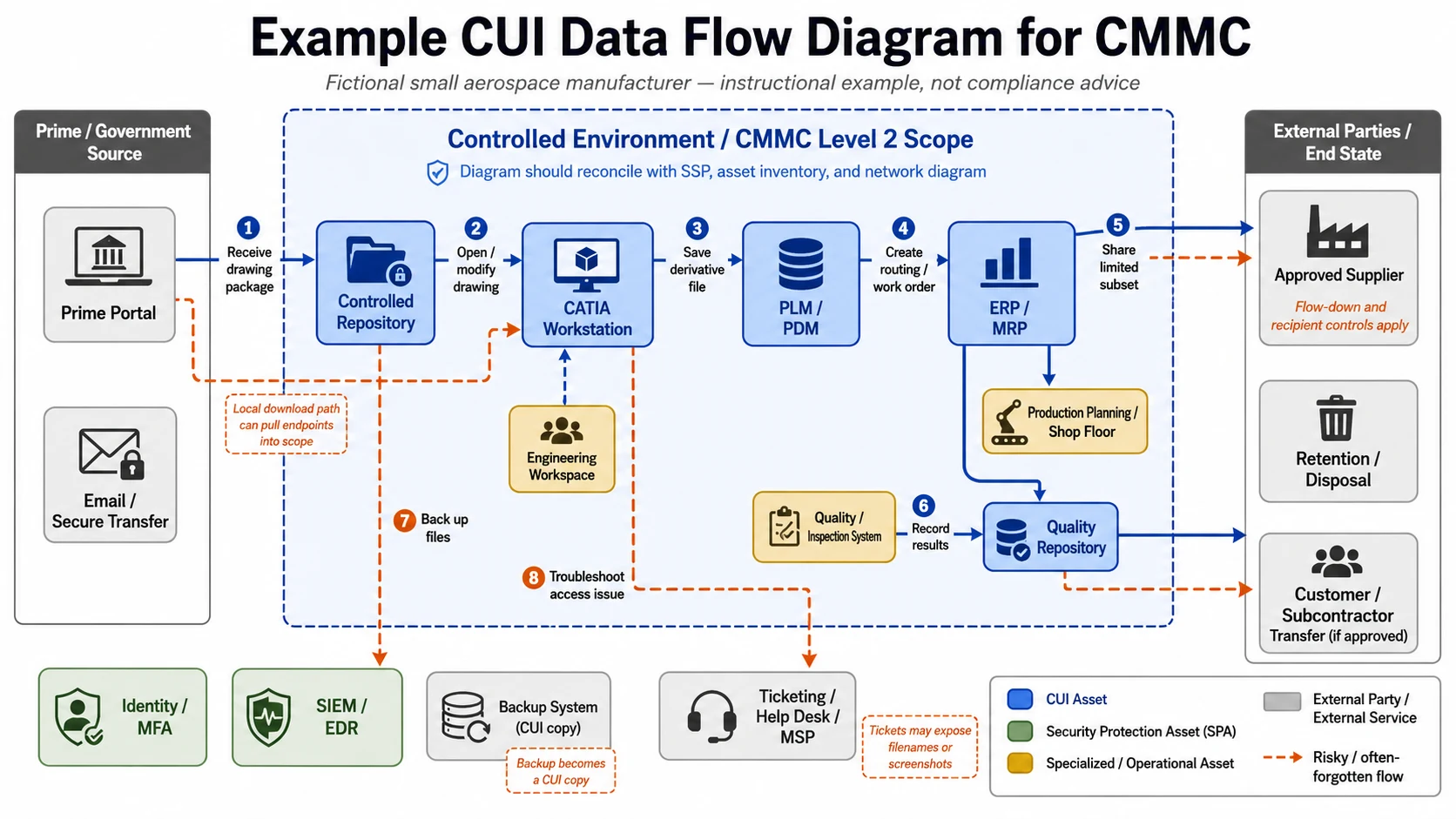
Where CUI leaks out of Box
A correctly contracted and configured Box environment can keep CUI in one controlled place, but it doesn't shrink your CMMC scope by itself. The Level 2 rule expressly brings the on-premises infrastructure connecting to the CSP offering into the assessment scope, and the scoping rule also reaches assets that process, store, transmit, or protect CUI (32 CFR 170.16(c)(2)(iii); 32 CFR 170.19(c)).
A laptop or phone that stores CUI, an application that receives it, and a service that protects the CUI environment each creates a scoping and evidence question. An outside supplier's environment is not automatically part of your assessment scope, but the CUI still needs protection there and the applicable clause must be flowed down.
Picture a locked records room. It only keeps records safe if the side doors are locked too.
| Side door | What happens to CUI | What to do |
|---|---|---|
| Box Drive (sync) | Copies land on the laptop's disk | Allow sync only on managed, encrypted devices, or turn it off for CUI folders |
| Browser downloads | A copy sits in the Downloads folder | Block downloads where the workflow permits, or manage and document the device |
| Mobile app and offline files | Files may be cached or opened on the phone | Use device management with encryption and remote wipe, or turn off offline access |
| Shared links | A broadly accessible link can expose the file beyond the approved recipient set | No open links on CUI; use named collaborator access and test the restriction |
| Outside collaborators | Your sharing configuration is in scope; the recipient's environment carries its own protection and flow-down duties | Approve recipients, restrict domains and downloads, require strong authentication, review access, and confirm flow-down |
| Integrations, APIs, and Box's MCP server | Content can move into another company's service | Keep an inventory. Allow only services whose boundary and evidence you have checked. Block the rest from CUI paths. |
| Box AI and newer features | Content may be processed through additional models or services | Keep CUI out until Box confirms the exact feature and processing path in writing for your order |
| Backups, eDiscovery, data-loss prevention, and log tools | They may copy CUI or handle Security Protection Data | Map each one. A service that handles only Security Protection Data may be assessed as a Security Protection Asset under 32 CFR 170.19, Table 4. |
| Your sign-in provider and administrative systems | They control or protect access to CUI | Categorize the relevant assets and evidence as Security Protection Assets when they meet the rule's definition |
| Support tickets | Screenshots and attachments can carry CUI into a support system | Never attach CUI. Ask Box for the approved FedRAMP support path. |
For a full walk-through of Level 2 scope, see the CMMC scoping guide. For drawing your data flow, see CUI data-flow diagrams.
Box AI, Hubs, Sign, and newer features
Box has said some features are covered at FedRAMP High, but those statements are dated and several newer features were only "expected" to be audited. Keep any feature away from CUI until Box confirms it for your order, tenant, and certified boundary.
| Feature | What Box has said | Source and date | What to do |
|---|---|---|---|
| Box AI | Box called it "FedRAMP High-compliant." Box also says Box AI uses models from outside providers. | Box release, March 27, 2025; AI Trust page, checked Sept. 24, 2026 | Keep it off CUI until Box identifies the covered models, processing path, and boundary for your account |
| Box Hubs | Box said it was covered at FedRAMP High | Box release, March 27, 2025 | Confirm in writing for your order |
| Box Sign | Box said it was covered at FedRAMP High and DoD Impact Level 4 | Box blog, March 2025 | Confirm the exact plan, tenant, and boundary |
| Forms, Doc Gen, Apps, AI Studio, Archive | Box said they were expected to go through a summer 2025 FedRAMP audit. We found no current public boundary update. | Box blog, March 2025 | Keep off CUI until confirmed |
| 1,500+ integrations | The pricing page advertises the integration count, but each integration creates its own data path | Box pricing page | Check each one before it touches CUI |
Sharing with primes and suppliers
Box makes outside sharing straightforward. That flexibility can be a practical advantage for defense suppliers and the largest uncontrolled path if the settings, recipients, and downstream systems are not governed.
Box's current support documentation describes controls you can evaluate:
- limit outside collaboration to allowlisted email domains, noting that Box ties this feature to Box Governance and enablement by request;
- restrict outside collaboration per user and set appropriate defaults; and
- require two-step verification for outside collaborators where the documented prerequisites and settings are met.
Those capabilities are not proof that your plan includes them or that they are turned on. Confirm the order, add-ons, prerequisites, and enforcement with Box, then test the path with a non-sensitive file.
Remember the other company's side too. The 7012 clause must be flowed down to subcontractors that handle covered defense information, including commercial ones (DFARS 252.204-7012(m)). A supplier that opens your CUI in Box has to protect it on its own systems. More on that in CMMC flow-down requirements.
The Box CMMC evidence checklist
Run these checks in order, either before CUI goes into Box or before you submit or affirm a CMMC status that assumes Box is ready. "Unknown" is never a pass. The checklist gives you a decision and a to-do list, not a compliance score.
Contract and data
| # | What to confirm | Evidence to keep | If it's missing |
|---|---|---|---|
| 1 | Your required CMMC level and assessment type, from the solicitation, contract, or prime's flow-down, and whether DFARS 252.204-7012 is in it | Clause text, the prime's written direction, any amendment or modification | Stop. A product can't tell you your level. |
| 2 | Whether Box will hold FCI, CUI, both, or neither | Markings, contract data requirements, owner sign-off | Stop. Sort out the data first. |
| 3 | A data-flow map for Box | A diagram showing how files arrive, who opens them, on which devices, plus outside users, apps, exports, backups, and logs | Your scope is unknown |
Box's service and paperwork
| # | What to confirm | Evidence to keep | If it's missing |
|---|---|---|---|
| 4 | The service name and FedRAMP record | A dated Marketplace printout: Box Enterprise Cloud Content Collaboration Platform, F1212191840A | Don't rely on a badge or an old screenshot |
| 5 | Your exact order, enterprise ID, tenant, and enabled CUI features are inside that service | Box's written boundary confirmation; order form or quote; tenant and feature evidence | Stop for CUI |
| 6 | Every feature you'll use with CUI is covered | Box's written feature list | Turn that feature off for CUI folders |
| 7 | Current service description and responsibility matrix | Box documents with version and effective date (may require an NDA), mapped into the SSP | Your security plan can't show who does what |
| 8 | DFARS 7012(c) through (g) support in writing | Contract term or addendum covering notice, malicious software, preservation, forensic access, and damage assessment | Contract gap for CUI |
| 9 | Encryption evidence where cryptography protects CUI confidentiality | Current NIST certificate numbers and operational environments for the relevant Box and endpoint modules | Technical-evidence gap; a marketing algorithm name is not a validation record |
Your setup
| # | What to confirm | Evidence to keep | If it's missing |
|---|---|---|---|
| 10 | Sign-in: SSO with MFA, or Box two-step sign-in as a company-wide setting; a short admin list; an emergency-access plan | Sign-in provider export, MFA policy, admin list | Access-control gap |
| 11 | Joiners, movers, leavers, and regular access reviews | Written procedure, dated reviews, removal tickets | Stale accounts become findings |
| 12 | Outside sharing locked down: approved domains, per-user limits, two-step for outsiders, no open links on CUI | Setting screenshots, shared-link report | Block outside access until fixed |
| 13 | A CUI label and enforceable rules that restrict downloading, outside sharing, or printing where the workflow requires it | Label, policy export, plan/add-on proof, and a test result | You're relying on people to remember |
| 14 | Box Drive, downloads, and mobile limited to managed devices, or blocked | Device-management records, device list, a test showing an unmanaged device is refused | Those devices join your CUI scope |
| 15 | Apps, integrations, AI features, backups, eDiscovery, and log tools mapped | Integration inventory, each outside service's status, approvals | Your boundary is incomplete |
| 16 | Logs exported, kept, and reviewed | Sample export, retention setting, review tickets | Capability without evidence |
| 17 | An incident plan that works across you and Box | Plan with Box contacts, the 72-hour DoD reporting step, preservation steps, a tabletop record | Operational gap |
Records
| # | What to confirm | Evidence to keep | If it's missing |
|---|---|---|---|
| 18 | Security plan, asset inventory, diagrams, applicable SPRS CMMC status and affirmation, and Box's mapped CRM duties all describe the same boundary | Reconciled documents and SPRS record | A mismatch. Fix it before any affirmation. |
| 19 | A signed go/no-go decision | Approved uses, banned uses, open gaps, owner, review date | No one has actually authorized CUI in Box |
The CMMC security plan template and CMMC readiness checklist help with rows 7, 17, and 18.
Do not enter CUI, drawings, credentials, system diagrams, contract text, or sensitive details. Your answers stay in this browser and are not sent anywhere.
Box CMMC Check
Part A — Quick fit
Complete all five questions.
Part B — Evidence status (optional)
Open this section or change a row to activate evidence status. Untouched rows are Unknown once active.
| # | Check | Status | If it's missing |
|---|---|---|---|
| 1 | Your required CMMC level and assessment type, from the solicitation, contract, or prime's flow-down, and whether DFARS 252.204-7012 is in it | Stop. A product can't tell you your level. | |
| 2 | Whether Box will hold FCI, CUI, both, or neither | Stop. Sort out the data first. | |
| 3 | A data-flow map for Box | Your scope is unknown | |
| 4 | The service name and FedRAMP record | Don't rely on a badge or an old screenshot | |
| 5 | Your exact order, enterprise ID, tenant, and enabled CUI features are inside that service | Stop for CUI | |
| 6 | Every feature you'll use with CUI is covered | Turn that feature off for CUI folders | |
| 7 | Current service description and responsibility matrix | Your security plan can't show who does what | |
| 8 | DFARS 7012(c) through (g) support in writing | Contract gap for CUI | |
| 9 | Encryption evidence where cryptography protects CUI confidentiality | Technical-evidence gap; a marketing algorithm name is not a validation record | |
| 10 | Sign-in: SSO with MFA, or Box two-step sign-in as a company-wide setting; a short admin list; an emergency-access plan | Access-control gap | |
| 11 | Joiners, movers, leavers, and regular access reviews | Stale accounts become findings | |
| 12 | Outside sharing locked down: approved domains, per-user limits, two-step for outsiders, no open links on CUI | Block outside access until fixed | |
| 13 | A CUI label and enforceable rules that restrict downloading, outside sharing, or printing where the workflow requires it | You're relying on people to remember | |
| 14 | Box Drive, downloads, and mobile limited to managed devices, or blocked | Those devices join your CUI scope | |
| 15 | Apps, integrations, AI features, backups, eDiscovery, and log tools mapped | Your boundary is incomplete | |
| 16 | Logs exported, kept, and reviewed | Capability without evidence | |
| 17 | An incident plan that works across you and Box | Operational gap | |
| 18 | Security plan, asset inventory, diagrams, applicable SPRS CMMC status and affirmation, and Box's mapped CRM duties all describe the same boundary | A mismatch. Fix it before any affirmation. | |
| 19 | A signed go/no-go decision | No one has actually authorized CUI in Box |
If the checklist turned up gaps, the next question is who should close them. A contract question, a Box setup job, a device problem, and a full readiness project each call for a different kind of help.
Worked example: a 40-person machine shop on Box
This example is hypothetical: Box was used for everyday contract files, and then CUI showed up. Watch how the checklist turns "Box is FedRAMP" into a real decision.
Say you run a 40-person machine shop on Box Business Plus. In this hypothetical, its quotes, purchase orders, and delivery schedules are FCI, no CUI is in Box yet, and Level 1 can be workable on that plan if the company implements and documents all 15 safeguards.
Then a prime starts dropping drawings marked CUI into a shared folder. Twelve engineers sync that folder to their laptops with Box Drive, and only three of those laptops are centrally managed. An outside engineer can download files. Nobody has Box's responsibility matrix. Your security plan still says CUI lives on the old file server.
| Check | Result |
|---|---|
| 2. Data type | CUI, confirmed |
| 5. Account inside Box's certified service | Unknown. Business Plus lists no FedRAMP, and there is no written order/tenant mapping. |
| 7. Responsibility matrix | Missing |
| 12. Outside sharing | Gap: one outside engineer can download, and downstream controls are unverified |
| 14. Laptops | Gap: 12 laptops hold CUI, 9 unmanaged |
| 18. Records match | Gap: the security plan points to the wrong system |
| Decision | Stop new CUI uploads, restrict access, preserve evidence, review for a reportable incident, and pick a documented path |
You have three realistic paths in this hypothetical.
| Path | What it takes | Box list-price math (Sept. 24, 2026) |
|---|---|---|
| A. Contract for a Box CUI configuration tied to the listed service | Get written mapping for the order, tenant, features, and package; obtain the CRM and DFARS incident terms; manage all 12 laptops or turn off sync for the CUI folder; control the outside engineer; update your records. | Enterprise base plan, annual billing: 40 × $35 × 12 = $16,800/year, versus 40 × $25 × 12 = $12,000/year on Business Plus. That's $4,800/year more before any FedRAMP configuration, add-ons, support, migration, or setup help. |
| B. Keep Business Plus for everyday work, put CUI in an enclave | Move CUI work for the dozen people who touch it into a separate CUI environment. If Box can still hold CUI but is not intended to, document and manage it as a Contractor Risk Managed Asset; if it is technically or logically unable to handle CUI and meets the rule's separation test, document it as out of scope. | Box cost unchanged. See CMMC enclave cost for the enclave side. |
| C. Evaluate a broader government collaboration environment | This can make sense if CUI also moves through email, Teams, calendars, and other collaboration workflows—not just files. | See GCC High cost and licensing. |
The price math assumes all 40 users are on the same public base plan at Box's published annual list prices. It's not a quote and it does not price a verified CUI configuration.
The lesson isn't that Box failed. The failure was assuming a FedRAMP listing answered the order, tenant, laptop, outside-user, contract, and paperwork questions. It never does.
Is Box the right home for your CUI?
Box can fit when your CUI is mostly documents shared with a known set of people, and you can keep devices, apps, and outside users inside a disciplined boundary. It's a weaker center of gravity when CUI also lives in email, chat, CAD, ERP, or shop-floor systems.
These options aren't ranked; each fits a different situation.
| Your situation | Better first move | Read next |
|---|---|---|
| CUI is mostly files, you share them with suppliers, and you already run Box | A Box order and tenant tied in writing to the qualifying cloud service offering, with the CRM and downstream paths controlled | The checklist above |
| Only a small group touches CUI | Keep Box for everyday work and wall CUI off in an enclave | CMMC secure enclave, CUI enclave providers |
| CUI moves through email, Teams, and calendars too | Evaluate a broader government collaboration environment rather than solving only file storage | GCC High for CMMC, enclave vs GCC High |
| You mostly send and receive files, rarely collaborate | A file-transfer portal with the required FedRAMP and DFARS evidence | CMMC compliant file sharing, Kiteworks profile |
| You build custom apps that handle CUI | Government cloud infrastructure | AWS GovCloud, Azure Government |
| Box can't confirm your account or supply the matrix | Don't treat unknowns as evidence. Pick a path you can document. | PreVeil alternatives, FedRAMP equivalency |
| You expected Box to cover all 110 requirements | Reset the plan. Box is one piece, not the program. | CMMC readiness checklist |
If you're torn between keeping Box, adding an enclave, and evaluating a broader government collaboration environment, a few facts decide it: where your CUI actually travels, how many people touch it, and when your contract needs proof.
What Box costs for CMMC use
Box publishes list prices for its business plans. It doesn't publish the price of FedRAMP High or of add-ons like KeySafe, Shield, Governance, or Zones.
CMMC Level 2's cloud baseline is FedRAMP Moderate or higher, so the rule does not independently require High. But a pricing card that says "Moderate" does not prove that your order and tenant map to a qualifying Marketplace offering. Get the exact service and boundary in writing before treating the base plan as a CUI solution.
Box's published prices, per user per month, minimum three users (box.com/pricing, checked September 24, 2026):
| Plan | Billed annually | Billed monthly | FedRAMP on the public plan card |
|---|---|---|---|
| Business Starter | $5 | $7 | Not listed |
| Business | $15 | $20 | Not listed |
| Business Plus | $25 | $33 | Not listed |
| Enterprise | $35 | $47 | FedRAMP Moderate; High at additional cost |
| Enterprise Plus | $50 | Not shown; switch to annual billing | FedRAMP Moderate; High at additional cost |
| Enterprise Advanced | Not publicly listed | — | Includes all Enterprise Plus capabilities; exact FedRAMP configuration requires a quote and written boundary confirmation |
Not published:
- the FedRAMP High add-on;
- the price or contract terms of any specific FedRAMP Moderate configuration;
- KeySafe (customer-managed encryption keys);
- Shield on lower plans;
- Governance;
- Zones;
- setup or consulting help.
When you ask for a quote, get each of these as its own line:
- the base plan;
- the exact cloud service offering, package ID, order/SKU, tenant, and included features;
- whether Box describes the configuration as Moderate or Class D (High), and the evidence connecting it to the Marketplace or DoD-policy basis;
- the user count;
- each add-on;
- the document covering DFARS 7012(c) through (g);
- logging and evidence-retention options;
- the support tier;
- migration help; and
- renewal terms.
For the wider budget, see CMMC Level 2 cost.
ITAR, export-controlled data, and DoD Impact Level 4
No blanket product certification makes every customer workflow ITAR-compliant, and export control is a separate legal and contractual analysis from CMMC. ITAR is the International Traffic in Arms Regulations and EAR is the Export Administration Regulations. Box lists ITAR and EAR among its compliance materials and says the supporting documentation is available under NDA; that does not establish that a particular order, tenant, user population, support path, or workflow is acceptable.
Here is what Box says publicly, without independent verification from us:
- its ITAR documentation is available under NDA;
- the Box service is hosted on Google Cloud Platform;
- for FedRAMP customers, Box says data is processed and stored in the U.S. and uses continental U.S.-based support escalations; and
- KeySafe, for customer-controlled encryption keys, is a paid add-on.
Before export-controlled drawings go into Box, get written answers to four questions:
- What export classification and authorization govern this data and recipient set?
- Who can reach the files, including Box and subprocessor staff, and what citizenship and location restrictions apply?
- Where is the data stored and processed?
- Who controls the keys, and what does that control actually prevent?
Then confirm the workflow with qualified export counsel. CMMC for ITAR companies covers the rest.
What about DoD Impact Level 4? Impact Levels are DoD cloud-authorization tiers, and Box states that it holds DoD SRG Impact Level 4 authorization. That company statement does not replace the current authorization documents for your service. IL4 and the CMMC contractor-cloud test answer different questions. When a contractor operates a cloud IT service or system on behalf of the Government, DFARS 252.204-7012(b)(1)(i) points to the separate requirements in DFARS 252.239-7010. If your contract names an Impact Level, get the current DISA authorization materials and follow the contract.
What the 2026 CMMC suspension changes for Box users
The July 13, 2026 suspension changed which CMMC assessment designations contracting personnel may use during the review. It didn't change the Box cloud test. DFARS 252.204-7012 remains in effect, and 32 CFR 170.16 remains the rule for a Level 2 (Self) environment using a cloud service provider. The Department also says it will use select government-led assessments.
| Changed after July 13, 2026 | Did not change |
|---|---|
| The Nov. 10, 2026 move to Phase II was suspended | Phase I Level 1 (Self) and Level 2 (Self) requirements remain in place (CMMC page) |
| During the suspension, requiring activities may designate Level 1 (Self) or Level 2 (Self), not Level 2 (C3PAO) or Level 3 | DFARS 252.204-7012 remains in effect (implementation memo) |
| Active solicitations and existing contracts with affected third-party or Level 3 language are to be amended or modified as directed | The CSP text in 32 CFR 170.16(c)(2), NIST SP 800-171 Revision 2 baseline, and annual affirmation rules remain in the current rule |
| The implementation memo says no CMMC waivers will be granted during the review | Your actual solicitation, contract, security plan, CRM mapping, CMMC status, and SPRS affirmation still have to agree |
A C3PAO is a CMMC Third-Party Assessment Organization. The Level 2 C3PAO and Level 3 paths still exist in 32 CFR Part 170, but the current procurement suspension limits which designations may be used during the review.
Holding a solicitation or contract that still names a C3PAO or Level 3 assessment? See CMMC Phase 2 status.
If something has already gone wrong
CUI is already in a Business-tier or unconfirmed Box
Don't panic, and don't mass-delete. Deleting, moving, or overwriting first can destroy evidence you may need.
- Stop new CUI uploads and disable broad links or unnecessary external access.
- Preserve the folder structure, audit logs, sharing records, settings, alerts, support records, and affected-device evidence before making disruptive changes.
- Restrict access to the smallest authorized group consistent with containment and evidence preservation.
- Find out what is there and who or what opened, downloaded, synchronized, shared, processed, or exported it.
- Decide with your incident lead and counsel whether the facts meet the DFARS 252.204-7012 definition of a cyber incident. The definition covers a compromise or an actual or potentially adverse effect on a system or the information in it.
- If it is a cyber incident, rapidly report to DoD within 72 hours of discovery, preserve the required affected-system images and monitoring data for at least 90 days after the report, and be ready to support forensic access and damage assessment.
- After containment and the incident decision, move the files to an approved environment or contract for a documented Box configuration, then reconcile your security plan, inventory, diagrams, procedures, and SPRS records.
DFARS 252.204-7012 explained walks through the clause and 72-hour rule.
Your prime asks for "Box's CMMC certificate"
The Box service does not transfer a CMMC status to your contractor environment. Box holds a FedRAMP certification for a named cloud service offering. Send your prime the evidence that answers the actual question:
- the Marketplace package ID and dated record;
- Box's written order, tenant, and feature-boundary confirmation;
- the Box section of your security plan and responsibility mapping; and
- your own applicable CMMC status and affirmation evidence.
How to prove CMMC compliance to a prime has the full package.
Box's encryption paperwork after September 22, 2026
NIST moved FIPS 140-2 certificates to the Historical list on September 22, 2026. Historical does not mean revoked. NIST's Cryptographic Module Validation Program says agencies may continue using those modules in existing systems while assessing the risk of continued use; new systems must use modules with current validated status, which generally means FIPS 140-3 after the transition. Your security plan needs the actual certificate numbers, module versions, and operational environments—not only "AES-256" or a Box trust-page label. That's question 5 in the letter above. CMMC FIPS 140-2 requirements explains the rule.
What we verified
Checked September 24, 2026. We read:
- the FedRAMP Marketplace record for package F1212191840A and FedRAMP's current class definitions;
- the current eCFR text of 32 CFR 170.15, 170.16, 170.19, 170.21, 170.22, and 170.24;
- FAR 52.204-21 and DFARS 252.204-7012;
- the current Department of War CMMC pages, the July 13, 2026 suspension release, and the implementation memo;
- the official DARS listing for Class Deviation 2026-O0025, Revision 3, dated September 3, 2026;
- the NIST Revision 2 and June 2018 SP 800-171A publications incorporated by current CMMC, the Defense Pricing and Contracting source page and Acquisition.gov clauses identifying DoD Assessment Methodology version 1.2.1, current SPRS guidance, and the FIPS transition sources relevant to this page;
- Box's pricing, FedRAMP, Trust Center, AI Trust, developer, and support pages;
- Box's March 2025 FedRAMP announcements; and
- the Box Community thread on the responsibility matrix.
What we could not verify:
- Box's responsibility matrix, FedRAMP package, secure configuration guide, or customer-specific order documentation;
- whether any particular Box order, account, tenant, or feature is inside the certified service;
- Box's current cryptographic-module certificate numbers and operational environments;
- the current certified-boundary status of Forms, Doc Gen, Apps, AI Studio, Archive, or the MCP server;
- which Box AI models and processing paths are covered for a customer;
- Box's current DISA Impact Level 4 authorization documents;
- the price and contract terms of Box's FedRAMP configurations and add-ons; or
- a public Reform Task Force outcome or replacement Phase II date.
We did not test Box. This is source analysis, not a hands-on review.
Box CMMC compliance: frequently asked questions
Is Box CMMC certified?
The Box service does not give or transfer a contractor's CMMC status. Under the rule, a CMMC status attaches to the Organization Seeking Assessment's defined CMMC Assessment Scope. Box holds a FedRAMP certification for a named cloud service offering, which can support the contractor's environment but cannot stand in for its scope, controls, evidence, assessment, or affirmation.
Is Box FedRAMP High or Moderate?
The Marketplace lists Box Enterprise Cloud Content Collaboration Platform as Class D (High). Box's pricing page separately markets FedRAMP Moderate on Enterprise and Enterprise Plus plan cards and High at additional cost. Those statements are not interchangeable proof: for CMMC Level 2, the exact cloud service offering must meet the Moderate-or-higher test, and Box must connect your order, tenant, and features to that offering in writing.
Can we use Box Business Plus for CUI?
Not on the public record reviewed September 24, 2026. Box's pricing page lists no FedRAMP option for Business Plus, and we found no public evidence tying it to package F1212191840A. Business Plus can still be part of an FCI-only Level 1 environment when the contractor implements and documents all 15 safeguards.
Does Box satisfy DFARS 252.204-7012 for us?
No vendor label transfers the clause obligation to Box. You must require and ensure that the external CSP meets FedRAMP Moderate-equivalent security and supports paragraphs (c) through (g). The Marketplace listing speaks to the first part for the exact listed offering; your Box contract, incident process, and evidence must cover the second.
Where do we get Box's shared responsibility matrix?
Ask Box Product Support or your account team, and name your legal entity, order, enterprise ID, tenant, plan/SKU, and package ID. A Box community manager wrote in June 2026 that they believed the matrix was supplied under NDA and suggested a support ticket. Because that was a forum response rather than formal policy, confirm the current route in writing and keep the correspondence.
Does Box Drive put our laptops in scope?
Yes when it synchronizes or caches CUI on them: those devices process or store CUI. Manage and document them or block the path, and test that the setting works. A laptop that merely reaches a login page without processing, storing, transmitting, or protecting CUI is not brought into scope by brand association alone; follow the rule's actual asset functions.
Can a supplier on a free Box account work in our CUI folders?
A free account is not proof that the supplier's identity, device, downloads, or downstream environment protect CUI. Use named recipients and technical restrictions, and flow down DFARS 252.204-7012 when subcontract performance involves covered defense information. The supplier must protect the CUI on its own systems and provide its incident-report number up the subcontract chain when the clause requires it.
Is Box AI safe to use on CUI?
Box said in March 2025 that Box AI was covered at FedRAMP High, and its current AI materials describe outside model providers. Ask Box which exact models, processing paths, tenant configuration, support paths, and features are inside your certified boundary. Until Box confirms those facts for your order, keep CUI out of Box AI.
Is Box ITAR compliant?
No blanket product label resolves ITAR or EAR. Box lists ITAR/EAR material under NDA, but the customer still has to verify the data classification, authorization, users, citizenship and location restrictions, storage and processing locations, support access, keys, and contract. Confirm the particular workflow with qualified export counsel.
Do we need GCC High if we use Box?
Not automatically. A documented Box environment may solve a file-collaboration use case, while a broader government collaboration environment may fit when CUI also travels through email, chat, calendars, meetings, and connected applications. Map the full data flow before choosing either architecture.
Still not sure which CMMC path fits your company? Use The Defense Compliance Report's Find My CMMC Path tool to see which path and kind of help fit your contract, CUI, environment, and timeline — before you hire anyone.
Sources
All checked September 24, 2026.
CMMC and contract rules
- 32 CFR 170.15, Level 1 self-assessment and affirmation, eCFR
- 32 CFR 170.16, Level 2 self-assessment, cloud providers, cadence, and artifact retention, eCFR
- 32 CFR 170.19, CMMC scoping, asset categories, and Tables 3 and 4, eCFR
- 32 CFR 170.21, POA&M eligibility and closeout, eCFR
- 32 CFR 170.22, affirmations, eCFR
- 32 CFR 170.24, CMMC scoring, eCFR
- DFARS 252.204-7012, Acquisition.gov, MAY 2024 clause
- FAR 52.204-21, Acquisition.gov
- Department of War CMMC page, About CMMC, July 13 suspension release, and Implementing Suspension of CMMC Phase II memo
- Official DARS RFO class-deviation listing, including Class Deviation 2026-O0025, Revision 3
- NIST SP 800-171 Revision 2 and NIST SP 800-171A, NIST
- Defense Pricing and Contracting safeguarding source page, identifying NIST SP 800-171 DoD Assessment Methodology version 1.2.1
- Supplier Performance Risk System, including current contractor guidance
FedRAMP and NIST
- FedRAMP Marketplace: Box Enterprise Cloud Content Collaboration Platform, F1212191840A
- FedRAMP Marketplace designations and classes
- FedRAMP Consolidated Rules for 2026: providers
- NIST Cryptographic Module Validation Program and FIPS 140-3 transition guidance
Box (company-stated)
- Box FedRAMP page
- Box pricing
- Box Trust Center
- Box AI Trust
- Box MCP Server
- Box developer docs: FedRAMP
- Box blog: FedRAMP High authorization
- Box press release, March 27, 2025
- Box support: allowlisted domains, collaboration settings, and restricting outside collaboration
- Box Community: CMMC Shared Responsibility Matrix thread
Also see our methodology and Editorial & Advertising Policy.
About The Defense Compliance Report
The Defense Compliance Report is the independent trade publication and decision resource for CMMC and Defense Industrial Base compliance — explaining the CMMC Final Rule with primary-source citation on every claim and mapping a contractor's level, CUI scope, assessment type, and timeline to the right provider category, so DIB contractors choose the right CMMC path before they spend six figures.
We are not affiliated with the Cyber AB, the Department of Defense, DCMA DIBCAC, NIST, FedRAMP, Box, or any U.S. government agency. This page is educational research, not legal, contractual, or compliance advice. Confirm scope and applicability with a CMMC Registered Practitioner (RP) or a qualified federal-contracts attorney.